Get the files back. Explain the storage bill. See who can get in.
Seven tools inside one SPFx package your security team reviews once — zero API permissions, every SharePoint call published. Each unlocks with its own key, so you only pay for what you actually need.
to start — two tools need no key at all. Unlock the rest one at a time from €147, or all seven for €897 once.
Download free package See pricingThe shipped web parts, on a real SharePoint page.
Every screenshot below is the actual web part on a modern SharePoint page — the same package you download, no mock-ups.
Seven tools in the box. Two of them are free.
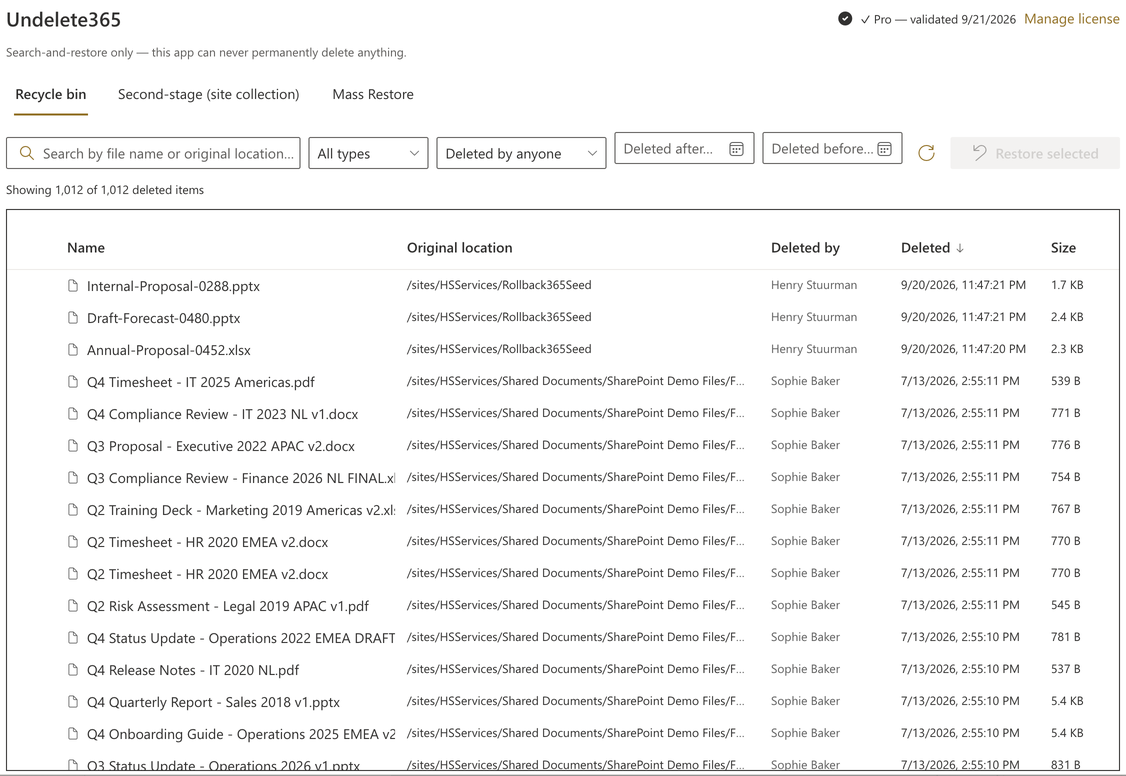
One-time · per tenantUndelete365
€249Search the SharePoint recycle bin by name, date, or who deleted it — and bulk-restore an entire incident in one job.
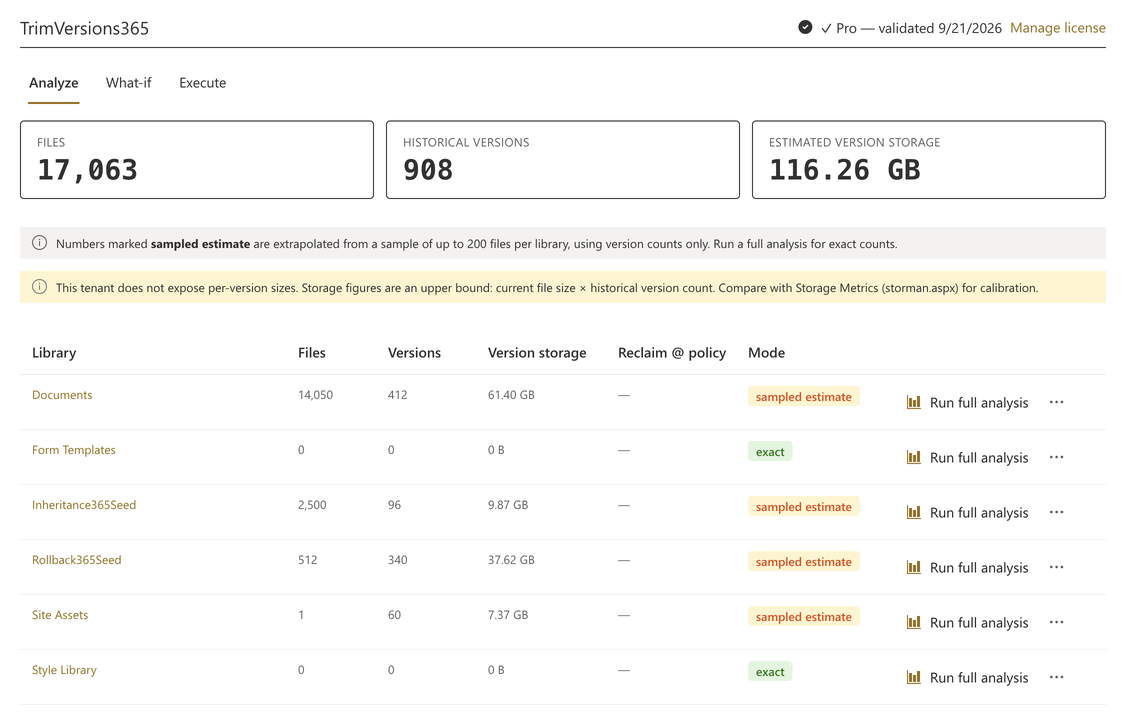
TrimVersions365
€249Analyze and safely trim version-history bloat — see exactly what a policy would delete before it deletes anything.
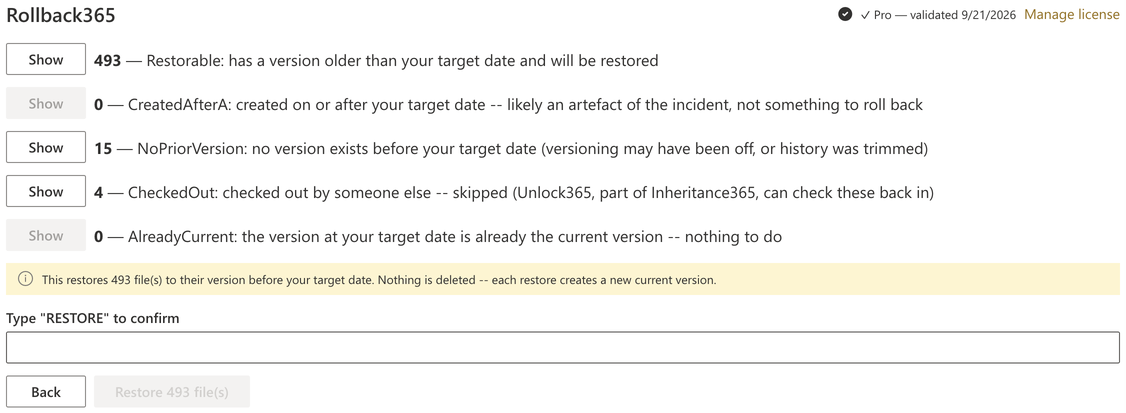
Rollback365
€399Roll a chosen set of files back to their version before a point in time — filter by who changed them, when, where and what type, dry-run the exact list, then restore. Files created after the incident or checked out by someone else are skipped and reported, and everything you didn't select stays untouched.
Simulate exactly who loses access before you reset permission inheritance — every name listed, guests first — and export the impact list before the reset will even run. Includes bulk check-in for files left checked out by people who've gone.
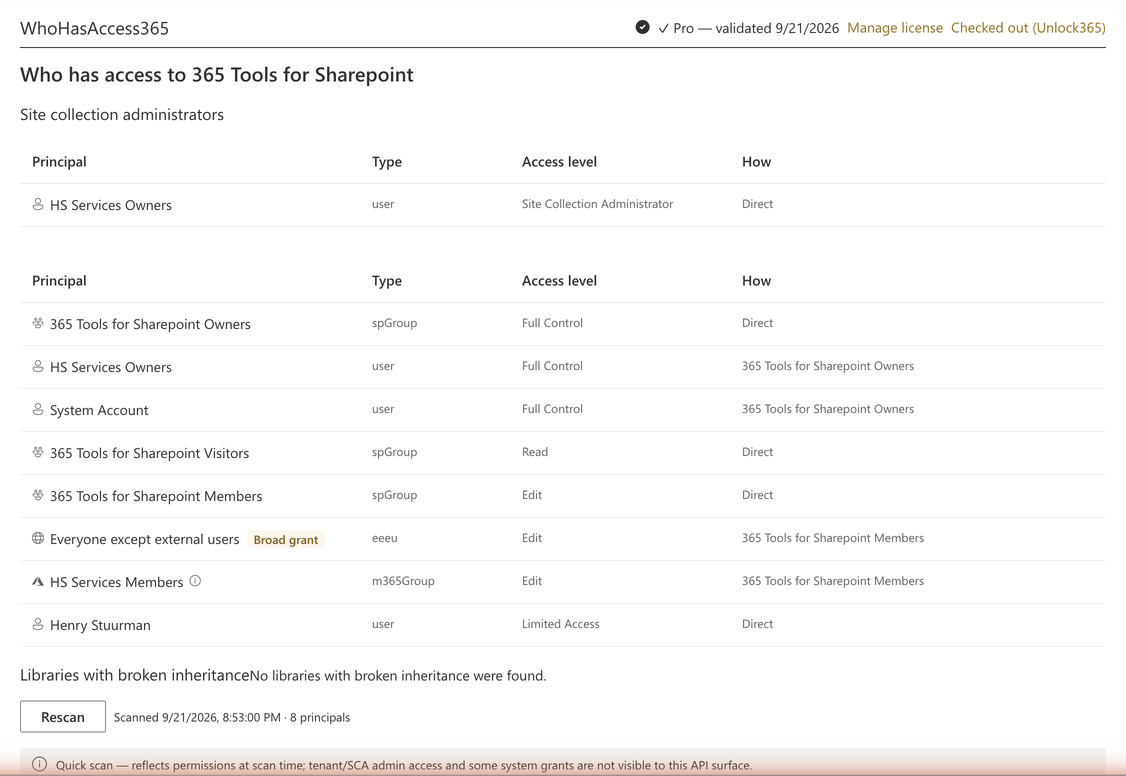
WhoHasAccess365
€147Read-only permissions and Entra group audit for a site — who can get in, and how. The site-level report is free; Pro adds the item-level sweep, sharing links, org-wide flags and CSV export.
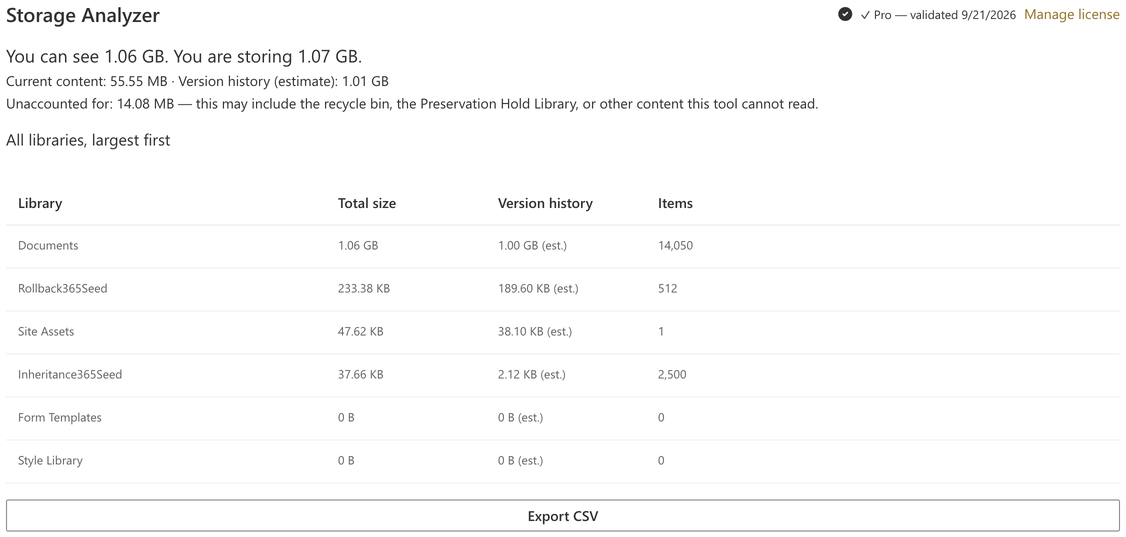
Storage Analyzer
FreeSee where a site's storage actually goes — version-history bloat, recycle bins, the Preservation Hold Library — with the top offenders and the gap between what you can see and what you're billed for. Free to look; drill-down and export come with TrimVersions365.
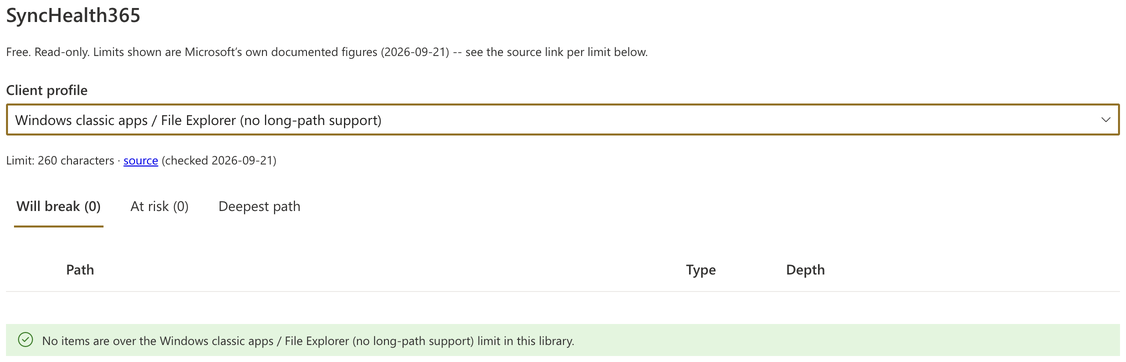
SyncHealth365
FreeScans file and folder paths against the real limits of SharePoint, OneDrive on Windows and Mac, and Office — before a rename or migration breaks someone's sync silently. Shows which single folder rename fixes the most.
Approve once. Unlock per key.
Governance suites bill per user, per year. This doesn't.
The platforms that cover this ground — storage visibility, version trimming, permissions reporting — are priced per licensed user on annual terms, with published starting tiers around €10 to €36 per user per year and minimum seat counts. TenantTools365 is priced once, per tenant, for the tools you pick.
| Tenant size | Other vendors' per-user suites their price, ≈ €24 per user per year |
Their cost over three years | Our price, all tools one-time, per tenant |
|---|---|---|---|
| 100 users | €2,400 / year | €7,200 | €897 once |
| 300 users | €7,200 / year | €21,600 | €897 once |
| 800 users | €19,200 / year | €57,600 | €897 once |
Illustrative, using the mid published per-user tier of the governance platforms in this category. Their scope is broader than this suite's — the point is the billing model, not a feature-for-feature match. Check current vendor pricing before you compare.
The key doesn't expire
Buy once and the tool keeps working — year three, year five, budget freeze or not. Nothing switches off because an invoice lapsed.
Hiring doesn't raise the price
Pricing is per tenant. Double your headcount and the cost of these tools is still what you already paid.
One approval covers what's next
Every future tool in the suite arrives inside the package your security team already approved, under the same all-tools key.
Don't trust us. Check.
Every SharePoint call each tool's application code makes, published per tool. This is the same table each product's own build fails against if it drifts — it isn't a promise, it's a machine-checked invariant, and every download includes a script that checks it against what you actually received.
| Tool | Call | Method | Destructive? |
|---|---|---|---|
| Undelete365 | …/_api/site/RecycleBin/RestoreByIds | POST | No — reversible |
| Undelete365 | …/_api/site/GetRecycleBinItems | POST | No — read only |
| TrimVersions365 | …/versions/DeleteByID(vid=…) | POST | No — old versions only, never the current one, never the file |
| TrimVersions365 | …/versions | GET | No — read only |
| WhoHasAccess365 | …/roleassignments, …/siteusers | GET | No — read only, no writes at all |
| Rollback365 | …/GetFileByServerRelativePath(…)/versions/RestoreByLabel(…) | POST | No — restores a named prior version by creating a new current version; removes nothing |
| Storage Analyzer | …/_api/site/usage, library/file listings | GET | No — read only |
| Inheritance365 | …/lists(…)/items(…)/resetroleinheritance | POST | The one write in this tool — structurally gated behind exporting the impact simulation first, and re-verified against HasUniqueRoleAssignments after |
| Unlock365 | …/GetFileByServerRelativePath(…)/CheckIn(…), …/UndoCheckOut() | POST | No — checks in or discards a checkout; never deletes a file or its content |
| SyncHealth365 | …/lists(…)/RenderListDataAsStream | POST | No — read only (SharePoint's own paged listing endpoint, POST verb, no write) |
| All Pro tools | license.tenanttools365.com/validate | POST | No — license check only (product name + key + tenant hostname, nothing else) |
None of SharePoint's recycle-bin removal endpoints, and no raw DELETE verb, appear anywhere in any bundle — not in source, not compiled, not built from strings. A per-bundle safety check fails the build if that ever changes. Every download includes verify-compiled-package.js, a dependency-free script that checks exactly what you were sent.
M365 & SharePoint admins
Approve one package, knowing exactly what it can and can't do — the permissions screen and the safety check are your evidence, not our word.
MSPs & consultancies
One package to deploy across client tenants, each tool licensed to whichever client bought it. Hand their security team the call table and the checker script.
Site owners
Get your recycle bin back, your storage bill explained, and your permissions list in one place — no separate app catalog reviews for each.
Singles or everything. One-time, per tenant.
Undelete365
Search the recycle bin and bulk-restore an entire incident. Already own the standalone product? Your existing key unlocks this tool inside the suite for free.
Buy Undelete365TrimVersions365
Analyze and safely trim version-history bloat, with a mandatory dry-run before anything is deleted.
Buy TrimVersions365WhoHasAccess365
Read-only permissions and Entra group audit. The site-level report is free with no key; Pro adds the item-level sweep, sharing links, org-wide flags and CSV export.
Buy WhoHasAccess365Rollback365
Roll a chosen set of files back to their version before a point in time — filter by who, when, where and file type, dry-run the exact list, then restore.
Buy Rollback365Inheritance365 + Unlock365
Simulate exactly who loses access before resetting permission inheritance — export the impact list first, or it won't run. Includes Unlock365's bulk check-in for stuck checkouts.
Buy Inheritance365Everything
FIVE TOOLS, SAVE €546All five paid tools plus the free ones, on one key, one App Catalog approval. Buy tools one at a time whenever you like; bought separately they come to €1,443.
Free forever: Storage Analyzer, SyncHealth365 — and every tool's free tier
Download the free package — no form, no license required. It contains all seven web parts, and every Free tier (search, analysis, the site-level permissions report) works with no key at all.
Managing several tenants? Volume pricing for MSPs isn't set up yet — email support@undelete365.com and we'll work something out.
Every tool runs as the signed-in user, requests no API permissions, works with custom scripting disabled, and sends nothing outside your tenant except the license check. The full list of SharePoint calls each tool makes is published on this page.
The questions you should be asking
I already own Undelete365 — do I need to buy it again?+
No. Your existing standalone Undelete365 license key unlocks the Undelete365 tool inside this suite too, at no extra cost. Paste the same key into the Undelete365 web part's settings when you install the suite package.
What permissions does this package need?+
None to configure. It requests zero API permissions and every tool uses the signed-in user's existing SharePoint session. Users can only see and act on what they could already see and act on by hand.
Do I need custom scripting enabled?+
No. Every tool in this suite is a standard SPFx web part — the deployment model Microsoft sanctions for SharePoint Online, running with custom scripting off, which is the default and the direction every tenant is moving toward regardless of what a workaround script needs.
Does anything in this suite delete files or empty the recycle bin?+
No. Undelete365's only write is restoring an item — reversible by design. TrimVersions365's only write is deleting old versions of a file, never the current version and never the file itself. WhoHasAccess365 makes no writes at all. None of SharePoint's destructive recycle-bin endpoints appear anywhere in any bundle, checked by an automated build gate and by the verifier script shipped with every download.
What data leaves my tenant?+
For a Pro tool, exactly one request: its license check, carrying the product name, your license key, and your tenant hostname — never file names, file contents, or user names. Storage Analyzer and SyncHealth365 are fully free and make no licensing call at all. Nothing else, from any tool, is ever sent anywhere.
Is this a subscription?+
No. Every tool is priced once, per tenant. There is no recurring billing and no per-seat pricing that grows with your organization.
Can I install just one tool and skip the others?+
You install the one package either way — that's the point of the suite — but each tool only unlocks with its own key. Buy just Undelete365 and every other tool stays on its free tier until you decide otherwise; nothing forces you to buy tools you don't need.
What's your refund policy?+
There is no refund policy — purchases are final, for this and every HS Services product. A key unlocks the software instantly and irreversibly the moment payment clears. Try the free package first: it costs nothing, needs no form, and ships with the same verifier script.
Start with the free package. Buy a key when you need one.
No form, no license, no API permissions. The verifier script is in the download.